25 February, 2007

Smalltalk: An Application Language

When I started this project, the largest concern I had was that forcing anyone to use object-oriented programming would be extremely limiting or even detrimental to the final application. I've had some very bad experiences with OOP in the past: lots of hidden execution time and gross obfuscation of - and sometimes impossible to follow - code. OOP is a tool, and sometimes an extremely useful one. But, is it one that should be used exclusively?

My theory was that perhaps OOP wasn't the problem, but rather the implementations that I had used (namely C++ and its derivatives). Perhaps Smalltalk, the grand-daddy of OO languages had it right. Fast forward 7 months....

A typical program might begin with a few modules of "super" code - code that can do anything and everything. Then, as the program develops and molds, functionality is extracted and moved into new modules. As this continues, the code becomes easier to read, maintain, and extend. This is a good thing.

One of the many lessons learned (the hard way) by good programmers is knowing when to stop. Eventually a point will be reached when the returns are minimal, and if continued, the code may become so obfuscated that maintaining and extended (and performance) can be severely impacted.

The OO paradigm can have a way of clouding the judgment of otherwise excellent programmers with the allure of "perfect" code. The kind of code where everything is in it's place, only knows about what it needs to know about, all arrows point in one direction, and hides 90% of what all other code shouldn't be concerned with.

Sadly, that kind of code doesn't exist in the real world. It only exists on paper. I have yet to see any significantly large MFC program where the following macros (or similar functions) weren't declared globally:
#define MY_FRAME ((CMyMainFrame*)AfxGetMainWnd())
#define MY_VIEW ((CMyMainView*)MY_FRAME->GetActiveView())
#define MY_DOC ((CMyDoc*)MY_VIEW->GetDocument())
And then, little by little, the document class starts making assumptions about the view, and now someone adding functionality down the road is in a lot of trouble.

Let's just clear the air right now: arrows only pointing one direction are a great starting point, and should be maintained as long as possible, but someday your application needs to ship, bugs need to get fixed, and the end user is never going to care that your rendering engine just happens to know about this one, special level. The end user will care, however, if it can't render the level properly or efficiently.

Surely, hiding data and code is good, though, right? Well, do you want to just trust that the interface library you just plugged into your code base isn't using 10x as much memory as needed, leaking half of it every frame, and slowing down the rest of your application? I didn't think so. And neither do I.

Performance is always a concern - especially in games. And I get sick to my stomach when I purchase a new 2D, turn-based strategy game like Civilization IV at the store and find that it recommends:
  • Pentium 4 CPU with at least 1.8 GHz
  • 512 MB RAM
  • 128 MB graphics card
  • 1.7 GB free hard disk space
Seriously, we're talking about a 2D, turn-based game! Oh, and my laptop beats those specs, and it still runs slow! Maybe Firaxis shouldn't have just trusted some of the 3rd party code they used.

OOP is a tool, and can be very useful. But, it, like Mr. Worldly Wiseman, has a bad habit of "promising" the removal of a great burden from the programmer: having to write real code at the end of the day. For some reason, many programmers still think with that with the proper framework and a double-click, their application will just appear.

Now, the curtain lifts, and in walks Smalltalk...

- "What? What's gonna happen?"
- "Something wonderful!"

Let me state this unequivocally: Smalltalk is an application language! It's about creating applications; it's not about creating code. And there is a world of difference between the two. It's about removing the mundane barriers from the programmer so that he or she can focus on the real-deal, get it done, and move onto the next task.

Smalltalk dispenses with the "arrow" notion. (This is the term I use for those pretty code design diagrams that show object hierarchies and what systems know about, and how all the arrows should only point in one direction). That's left up to the programmer. It's definitely wise to design up front, and write the code as cleanly as possible for as long as possible. But, when it's a time to swing the hammer and make it work, Smalltalk doesn't make a programmer jump through hoops to get the job done.

Nothing is hidden. Nothing. Not even the compiler. Programmers like Ian Bartholomew can create profilers, that allow profiling every line of my application - including the core Smalltalk image - without having to write one extra line of code. Anyone can modify the core libraries to add, improve, or even completely remove functionality if and when it's needed.

Most languages that pride themselves on enabling the programmer to develop applications quickly are founded on the premise that programmers can't be trusted. Visual Basic and C# both jump to mind immediately.

These languages fall terribly short after the first 30 minutes of use. This is usually due to one, simple development truth: time constraints mean that prototypes have a nasty habit of turning into the final application. How often have you had to fix a bug or add a feature in an existing C# application at work, only to open it up and see this?
public partial class Form1 : public Form {
private void button1_Click(...) {
// ...
}
}
The default names given to forms, buttons, and other common controls haven't been updated. The original programmer was just trying out an idea that the boss then liked, but there wasn't time to go back and do it right. So, now you are wasting time trying to work around default code that is already difficult to follow, because you didn't code it to begin with.

Perhaps you even want to take [what should only amount to] 30 seconds and fix the problem by updating the name from button1 to SendButton, but soon give up when you realize that changing the name doesn't update the auto-generated function names, but did move it from a public place to a private place when it was renamed, and there are several places in code where button1 is directly referenced. Another 30 minutes wasted, and now enough code has changed that QA should probably have another round with it. More money wasted.

And that isn't even the worst case scenario. The worst case is when the button name was set originally, but it's text and implementation is now completely different from the original name given (the SendButton is actually the CheckSpelling button). Now it's harder to maintain, and a good programmer will feel morally compelled to fix it.

These are problems that seriously impede the development of applications. Applications that reduce overhead and iteration time, generate revenue, and give the programmer weekends with the family. An "application language" should free the programmer of such tedious, downright ridiculous, responsibilities, without treating the programmer as a miscreant who doesn't know how to properly manage code.

This is what Smalltalk does for me. I only write the code that matters. If I need to rename a class, all references everywhere else in my sources are automatically updated for me. If I change a method name, a browser window opens allowing me to see every caller so that I promptly fix them. These are just two of many, many, many features, all possible thanks to the reflective nature of Smalltalk, due in no small part, to it's object-oriented approach to problem solving.

I have learned to embrace object-oriented programming [in Smalltalk]. When it is implemented well (dare I say "properly?"), this paradigm doesn't just constitute another tool in the toolbox; it is the toolbox, from which everything else stems.

Since I started this endeavor to create a 2D game engine in Smalltalk, I've not once - wait, let me reiterate this - not once have I stopped, and started over again. I'm still working in the same image I started with in late August, 2006. All my designs began with prototypes (*cough* hacks *cough*) inside the main code base, and yet the code is clean. When they worked, it took minutes to reorganize and re-factor the code properly. And when they didn't, it took minutes to strip out bad code, and restore the old.

I've honestly never had more fun programming! Smalltalk has actually made programming more fun than it already was. It allows me to iterate the code so fast! The speed at which I can try an idea, see what's wrong, switch gears, or continue molding until it's right is so ridiculously fast, that it's fun. It's been stated that programming isn't fun. Problem solving and code design are fun. Programming in Smalltalk is just that - all the time. It's fun.

22 February, 2007

Vista Ready!

Well, it's been a while since I updated. A lot of things have gone into the engine, and I'm continually tweaking some things. But some co-workers are starting to gain interest in not only what I'm doing, but Smalltalk as well. So, I decided to compile a To-Go version of what I have so far and bring it in for all to see...

I'm not too excited about Windows Vista, but boy did everything just work out of the box. Instead of "To-Go," it should be called "Just Works!" It ran wonderfully on Windows Vista, both 32- and 64-bit versions. So, there's one worry for the future alleviated. I think I owe that more to Microsoft and their obsessive desire for backwards compatibility, but it's nice to see that Dolphin integrates so well with the OS that entire new versions of the OS don't appear to negatively impact it.

Seeing the little asteroids game running at over 1200 FPS and watching people try it out and have a little fun (it's still a very incomplete demo) was good. In my spare time away from work and the engine I've been typing up a very comprehensive post that will be a very large summary of all my experiences with Smalltalk and Object-Oriented Programming [in Smalltalk]. It will be a kind of "The Good, the Bad, and the Ugly." Stay tuned.

25 January, 2007

Better Rendering Interface

One of the changes that I made when I pulled out the rendering from the engine into the GameRender object, was to really unify where the rendering happened, and move towards a more state-driven rendering (think OpenGL immediate rendering).

What I mean by this is that previously, a bunch of objects knew how to render themselves in odd ways. For example, GameSprite knew how to render itself at with some arbitrary transform. GameActor knew how to render the GameSprite, and FontResource could render text. This made testing easier, but as the interfaces are becoming more solidified, I definitely wanted to unify where and how the rendering happpened.

Enter the GameRender object, and now it is much cleaner. And also allows for more functionality, but at a bit finer level of detail. For example, currently the GameRender object has the following methods allowing the programmer to set render states and draw to the screen:
#alpha:
#blend:
#drawLine:to:
#drawBox:to:filled:
#drawSprite:
#drawText:
#font:
#loadIdentity
#origin:
#red:green:blue:
#rotate:
#scale:
#z:
So, using the above methods, an example of drawing a sprite somewhere on the screen, a line to the sprite, and some text would be:
(GameEngine current render)
loadIdentity;
origin: 100 @ 100;
rotate: 45;
drawSprite: mario;
drawLine: 0 @ 0 to: 100 @ 100;
font: courier;
origin: 10 @ 400;
drawText: 'FPS: ' , GameEngine current fps printString
This is actually much better for batching like-rendered objects together - characters in a string, sprites that all blend the same, or actors that should all render at transforms relative to each other. But, for just trivial rendering, it will probably be a little bit more troubling to code.

One minor concern I have is rendering state data carrying from one frame to the next. If the last object rendered on the previous frame was colored yellow, unless you reset the color at the start of this frame, it will be yellow again. Perhaps that isn't a serious problem, but unreset states bugs can be difficult to track down. Fortunately, actors always keep track of their entire state (transform, color, z-priority, alpha settings, etc), and will just render themselves in entirety.

Now I need to get background layers (tiled and non-tiled) and animated sprites working again. Once those are doing well I'll move onto the user interface system, which always turns out to be a beast no matter how simple it looks like it should be.

I'm starting to get pretty excited; I'm zeroing in on a pretty good engine.

22 January, 2007

Big Improvements

In the past few weeks the engine has seen lots of improvements. The framerate for all of my test applications has increased by roughly 80%. I don't have exact numbers in front of me right now, but the "zazaka" program is now significantly faster than the HGE version.

Vertex and pixel shaders are now fully supported. The engine defines a default vertex shader that it uses to render with extremely fast! on initialization (this also means the engine requires a video card that supports vertex shader version 1.1 at least).

With pixel shaders, though, the sky's the limit for cool effects.
Want your entire game to be rendered embossed or add blur effects, read from multiple textures or add any other number of special effects? It's all possible now.

Shaders go through the exact same resource management as all other resources, and are extremely easy to load, set, and use. For example, below is an example of how to load and start using a pixel shader:
ps := PixelShaderResource get: 'my_ps.pso'.
GameEngine current render pixelShader: ps.
As you can see from the above example, the actual rendering has been pulled out of the engine finally into its own class: GameRender. This was done for two reasons: simplify the engine class and if in the future I wanted to do 3D, this is where it would be done - subclassing GameRender into an immediate 2D render class and a batch 3D render class.

The GameActor class is now exactly how I want it - as just a node in the scene. It controls translation, rotation, and scaling. Actors can be parented to other actors, allowing for complex transformations (eg, a particle emitter attached to a sprite). The GameActor class now is subclassed into SpriteActor, which controls rendering of a sprite somewhere on the screen.

A pretty simple and well-featured particle system. Creating new particle effects in game and playing them is very simple and fast. There are 3 main classes which make up the particle effect system: GameParticleSystem (defines how particles will be emitted), ParticleEmitterActor (subclassed from GameActor), and ParticleActor (subclassed from SpriteActor). This has been the most flexible method of doing particles so far, as one GameParticleSystem can be used within many emitter objects very easily.

Spritemaps are now supported as a new resource type. They are extremely similar to fonts. An XML spritemap file is read off disk, which gives information about a texture and all the sprites inside of it. The spritemap object will create sprites that can then be referenced by SpriteActors by the name given to them in the XML file.
map := SpritemapResource get: 'sprites.xml'.
ship := SpriteActor fromSprite: (map sprites at: 'ship').
Right now spritemaps are very convenient for organizing data, but later when I add scrolling, tiled backgrounds they will be worth 10x as much as they are right now.

The last, simple, yet nice addition is the ability to set different blending modes. The engine supports additive, multiplying, solid, and alpha blending modes.

That about covers most of the recent changes and additions. Next I hope to clean up some more code and centralize more of the rendering code to be more flexible and easy to use, add render targets to the mix (this will open another level is visual effects), and I need to start planning how I'm going to do user interface widgets.

01 January, 2007

It's The Small Things...

Been working on the game engine all day today, and made a few minor adjustments that made a big difference. Since the Bitmap Font Generator can generate a font description file in XML, I decided to dump the parser I was using and switched to Microsoft's DOM parser for XML (built into Dolphin). This cut down on another 3rd party piece of code that may need to be maintained, and simplified the font code significantly.

What made it so much easier to code was Smalltalk's reflection capabilities, and being able to send dynamic messages to objects at runtime. I've used XML before for various programs, and many times, I end up with a piece of code that invariably looks like the following:
while(elt) {
if (!stricmp(elt->tagName, "info")) { ... }
if (!stricmp(elt->tagName, "common")) { ... }
if (!stricmp(elt->tagName, "pages")) { ... }

// next element
elt = elt->nextSibling;
}

And this is just terrible code. Terrible to maintain, terribly slow, and not scalable; as new data is added to the file, and new programmers need to add code to the above loop, it will just turn into one hell of a mess. I often see the inside of { ... } turn into more parsing code, instead of being broken out into another function. Eventually we end up with a several-hundred-line function that no one wants to touch for fear of breaking some unrelated piece of very fragile code.

So, how can the above be made easier (and more scalable) with Smalltalk and reflection? Well, each tag can just be turned into a method descriptor and called by the parsing code. The above in my font loading code looks like this:
[elt isNull] whileFalse:
[self perform: (elt tagName , ':') asSymbol with: elt.

"Next element."
elt := elt nextSibling]

So, the tag name itself is just used as the method that is called to parse it. In essence, the object just parses itself. Very slick. If there is ever a new tag added later on, I just add a new method to parse it and it should just work. Just the way code should.

Another nice, small, feature of the Smalltalk language is being able to cascade messages to the same object and a wonderful little method called #yourself. When possible, I like to code as functionally as possible (without sacrificing performance), and the above has allowed me to do this many times over. And - in my opinion - makes the code more elegant. Something one may see in C/C++ (or many other imperative languages) is the following:
bool SomeFunction()
{
if (SomeCondition) {
/* do something */
return true;
}
return false;
}

Now, there's nothing wrong with this. But it always feels a little dirty to me. You aren't really returning true or false from SomeFunction, instead, you are returning the result of SomeCondition, and that's not immediately apparent from reading the code. And, believe it or not, this does lead to bugs down the road when other programmers have to go in and do something to it.

So, how does message cascading and #yourself help in Smalltalk? Well, it allows me to perform actions based on the result of some statement or expression, and then actually return that result separate from the actions performed. The above could instead be coded:
^(someCondition)
ifTrue: [ "do something" ];
yourself

Anyone should be able to clearly see that someCondition is being returned, and other actions just happen to be performed based on that condition. That's going to be pretty hard to foul-up down the road. And, it looks nicer, too.

As I come across more Smalltalk elegance, I'll be sure to post them. But for today, these were the two that caught my eye the most often.

28 December, 2006

Asteroids Screenshot

I've had a few emails wondering on the progress of the little Asteroids game. To be honest, there isn't much to see at the moment; there's only a couple scenes: the main menu with instructions on how to play and the game scene where all the action takes place. A hearty thanks goes out to Ari Feldman for creating his SpriteLib graphics. I would hate to think just how bad the visuals of this clone would be without his work.

There's audio including some background music from a great site: Shockwave-Sound. I'm not very good at taking screenshots (at least not interesting ones), and there's a lot I'd like to add to this clone. Actually, each day it turns out to be less and less of a clone as I change the input scheme. In fact, I actually enjoy playing it while programming it - always the mark of something good to come. :-)


If there's one thing that this prototype of a game has done, it's shown the shortcomings of the engine I need to work on, where the engine shines (the actual game itself is very, very little code), and how much of a dream Smalltalk is to work with. I don't think - outside of work - I've even touched C/C++ in about 3 months. I think that, in and of itself, is a testament to just how good and complete Dolphin Smalltalk is.

Next I'll be adding a particle system to the mix and some simple particle emitters. That should add a whole extra layer of visuals to the engine very easily. As for the game, I need a nice starfield moving in the background, some shields still, and currently there's no way to die. The ship doesn't actually collide with the asteroids yet.

I'll post more screenshots later as more features are added. I'm hoping soon to actually have something downloadable for people to try on their machines.

22 December, 2006

Adding More Functionality

Work has been occupying most of my time of late, but over Christmas I've had some time off and been able to add more support for a few things.

At the end of the day, I very much want to not make use of Microsoft's D3DX library. While it is useful, Microsoft reenabled "DLL hell" with it, meaning that any user of an end-game would need a specific version of the DLL installed on their machine. In order to get rid of this library, I need to implement fonts and textures myself.

For bitmapped fonts, I'm making use of the Bitmap Font Generator. It's very good, and free. Just download it, create some bitmapped fonts with it and away you go. The code is almost exactly the same, and in many ways it's easier. To parse the .FNT file, I'm currently using Vassili's regular expression parser (ported by Chris Uppal). This has a few known issues with Dolphin, but I'm not using it for anything but simple expressions. In the end, I'll actually write my own parser, but for now, it works great.

Some nice benefits to having my own bitmapped font system is being able to calculate width, height, kerning, and render text in a meriad of ways (left, right, centered, boxed, etc), all very easily. It will also be significantly faster once I get batched rendering of quads in place, as right now each letter is rendering a single quad at a time. Inefficient, but very little text is ever actually rendered in a 2D game.

I haven't yet worked out my own texture loading and surface creation, but it's on my list of things to do. Microsoft's D3DX library supports an entire host of image formats. Most likely whatever I do will only support BMP and TGA files, but that's plenty. Perhaps PNG as well, but I don't want to rely on a 3rd party library for image loading.

XACT is a dream on the Xbox 360, but the PC version is behind the 360. This and other frustrations make it less than ideal for my game engine. So, I'm stripping it out. In its place I've been using the BASS Audio Library. It's a simple, and very well written audio library. It's shareware, and I'm sure many users of my engine won't want to purchase it, but it is free to use in non-commercial applications.

As for my previous post on the resource management, I've been putting together my prototype game for the engine (an Asteroids clone) and it was obvious very quickly that the current method of resource management would not scale at all; I knew that from the start, but I was hoping it would scale a little, but now it's apparent that it doesn't.

Tejon had a good idea, though, that I built on a little. I think there are a few kinks to work out still, but overall it's pretty good. In the GameResource class is a class instance variable that holds all the resources that have been loaded of that type. There is a class method #get: that will return the resource if it's already been loaded, or load it fresh and add it to the lookup table for that class.

It's definitely a lot more scaleable (as it's very much like every other resource system in existence). The kinks that need worked through? Currently each resource type's load method is #load:usingLocator:. I'd rather not pass the #get: method a FileLocator as well. My current solution is to set a locator in the GameEngine that all resources will use. So far I like this a lot. But what about resources that will be loaded from packfiles or memory? In theory I could create a subclass of FileLocator that searches packfiles for a resource (at least this is my current thinking). I need to think on this some more.

More to come soon...

26 November, 2006

Trying To Think Small

Progress on the game engine continues slowly. One of the reasons it is progressing a little slower than it otherwise would normally is that I'm trying things differently - I'm trying to do them the Smalltalk way. And, in the process, I'm attempting to assertain whether or not the Smalltalk way is the better way.

The best example of this (so far) is the resource system. A resource would be anything that is read from disk or memory that requires a Direct3D interface object. The two most obvious kinds of resources are textures and fonts. Later this system would also include sound banks, wave banks, render targets, and more.

The initial pass was nothing more than the brute-force C++ method: there's a font object, a texture object, a scene creates them on initialization, frees them when done, and uses them in between. This works fine, until one realizes that multiple scenes probably will want access to the same resources.

Now, for a typical program, having two different objects load the same object individually probably wouldn't be so bad. However, in this case, it's very bad. For a texture, we'd be using double the VRAM (if two scenes each loaded it). Excusing memory, there's an even bigger problem with doing this. State changes in Direct3D are a performance killer. Each one basically cause the GPU to finish doing everything currently sent to it, halt while it changes the state, and then you can continue to send instructions to it. And switching textures is a type of state change. So, having the same texture loaded in memory multiple times can cause unnecessary state changes.

In C++, this would be fixed by simply making textures global in some way. They would either be global variables, or there would be a texture system that manages all the loaded textures. Both are equally good solutions. However, the former method in Smalltalk (using global variables) isn't quite so elegant. So, for my first pass at a more Smalltalk-ish implementation of a resource manager, I decided to do just that, create a GameResourceManager object, that would handle the management of all loaded textures and fonts.

This worked, but it had some definite problems. The first problem is, of course, how are other objects going to gain access to these resources? Well, Smalltalk "tackles" the global variable problems through hash tables. And this certainly is a viable solution. So, trying a LookupTable in the resource manager worked, but not very well. Why not? Primarily because the resource manager didn't know how to load the resources. Each resource could load itself just fine, but then needed to be added to the resource manager. I didn't want some end-programmer using my library to have to "know" and add their resources to a manager. Equally frustrating was that each user of a resource had to accept the fact that it may not be loaded yet. This required lots of code that looked like this to be strewn about the game:


bg := GameEngine current resources at: 'mytexture'
ifAbsentPut: (TextureResource fromFile: 'media/bg.tga').

Obviously every single time I want to get a texture, I don't want to have to know not only it's name, but how to load it as well. Yuck. So, then I toyed with the idea of the resource manager knowing how to load the textures and automatically adding them to the LookupTable. This definitely wasn't the road I wanted to go down. What happens in the future? Should the resource manager know how to load every kind of resource the game ever needs? No, that would be horrible.

Over the next day, I thought about it some more. At one point I decided to stop and ask myself, "okay - what does Smalltalk do best?" The answer to that is obvious: objects. So, how could I use objects to solve this problem? Does Dolphin have anything that's a similar problem I could look at for help? As I started thinking more, it came to me that there was a similar problem (and one that I'd been making use of this whole time): dynamic libraries.

So, the proposed solution was this: what if there was no resource manager (or, what if Smalltalk itself was the resource manager for me)? What if every resource was really just a subclass? Since classes are objects in Smalltalk, I could make each texture, each font, each sound, etc, an actual class in my game - a singleton of sorts, that other objects could just get, and each would know how to load itself if needed.

The first step was to create the GameResource object. This would be a simple implementation of a resource singleton, and have instance methods for loading, unloading, and restoring (when Direct3D loses the device context). Next, I needed to make my font and texture objects just a subclass of GameResource. These would be slightly more specialized, actually knowing how to load and unload themselves, and how to render, etc. All that was needed now was to make a few class methods "describe" the resource. For a font, this was the #face, #height, #bold, and #italic methods. For a texture, this was the #fileName. And for future resources, there would be equally appropriate methods.

Now to test the idea and see how well it is in practice (note: the above changes took all of 20 minutes - another win for the Dolphin interface and Smalltalk in general).

In the little sample game that I'm working with, I just subclassed TextureResource and created BackgroundTexture. Overwrote the #fileName class method to return the correct filename, and that's it. Now anytime I want that texture for use, it's just:

bg := BackgroundTexture current.

If it isn't ready, it's automatically read from disk and created for me. If that's already been done, then I get a reference to it. What's even better, is that all the resources for the entire game can be listed, restored, loaded, or unloaded in a single line of code. For example, when the GameView is closed and DirectX shutdown, we need to release all the resources:

GameResource allSubclasses do: [:each | each unload].

Now, for a full-blown, giant game this does have drawbacks.

This method can unpredictably access the disk, and loading all the resources would hit the disk a lot, as opposed to reading a single, giant, compressed file that contained all our resources, uncompressing into memory, and then loading from there. However, I see that as trivial for two reasons: I'm not making giant games with this engine, and if I wanted to, I'm sure I could easily create a #loadFromMemory method and a #loadFromDisk method to specify how I would like the resources loaded.

Also, if a game were to have a lot of resources, there would be an awful lot of classes in the hierarchy tree. I still haven't decided if this is a big problem or not. Certainly for a very large game with thousands of resources, it would definitely be a problem. But I see this engine being used for games with an order of magnitude or two fewer resources.

On the flip side, one very nice advantage is being able to inspect every single resource in the game. I can check to see if it's loaded, how many objects are using it, etc. Later on, I could even add DirectX debug views so I could actually view the resources outside of the game while it's running. And that is very appealing.

There are still a few changes I'm considering, but they are pretty minor. Overall, I like the direction this is going, and progress continues forward. Next up will be character maps and hopefully a screenshot of the game running.

However, I'm curious to know if I'm walking on a slippery slope. Perhaps there are some known pitfalls to my current approach that someone can point out to me? Or perhaps there is a better way of creating the resource manager that I didn't see. Let me know what you think!

17 October, 2006

Screenshot and Simple Timings

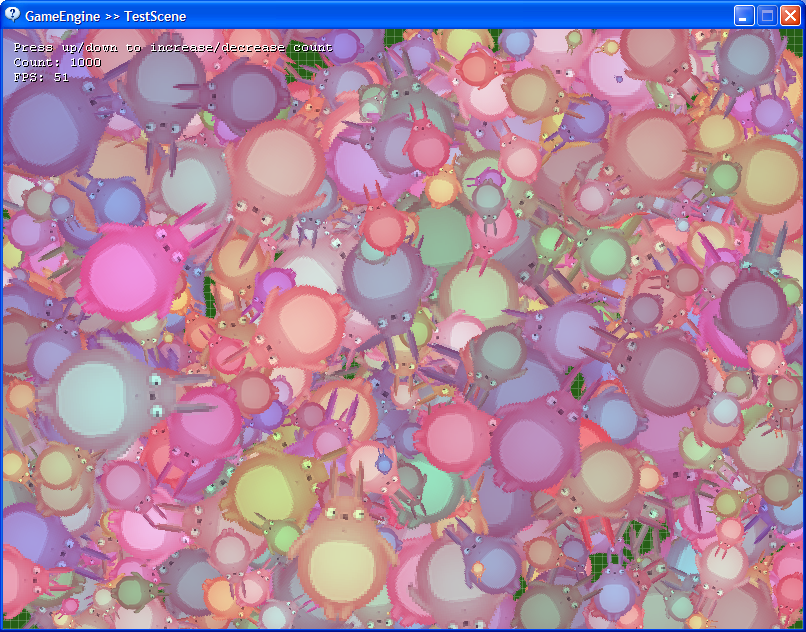
It's pretty late, and I'm getting tired, so I'll keep this short. I have enough implemented to get some simple applications made and start comparing timings. There is a nice C++ library out there using Direct3D 8 for rendering 2D graphics called HGE (Haaf's Game Engine). It's a nice engine. Simple. And I thought I would use it as a comparison for how fast mine is running in Dolphin.

If you were to download HGE, it comes with a tutorials folder that contains 8 sample programs. One of those tutorials (#7) is called "Thousand of Hares". I decided to duplicate 90% of the functionality in that demo (I don't have any blending support yet in my engine), and see how it ran against the C++ version. Please note that the framerates provided are on my laptop, and should be much improved on a desktop.


The idea is simple: display randomly moving, scaling, and rotating "zazakas". Using the up and down arrow keys, you can adjust the number being rendered every frame between 100 and 2000. That's it. And to make a long story short, I was very impressed with the results (HGE framerate on the left vs. my framerate on the right):

100 sprites - 277 FPS vs. 251 FPS
500 sprites - 105 FPS vs. 97 FPS
1000 sprites - 63 FPS vs. 54 FPS
2000 sprites - 33 FPS vs. 27 FPS

A couple things to note: starting around 1000 sprites, HGE began to "skip" (every 100 frames or so the program would stutter). My version didn't skip at all (even after very, very prolonged running). This was actually very surprising to me, since I expected Dolphin to skip eventually due to a garbage collection. This never happened.

Also, it should be noted that I have a lot more optimizations left to do. I'm currently drawing every single sprite to the screen individually (this is very bad for performance in Direct3D) as opposed to batching them up and rendering them all in one shot (which HGE already does).

If I wasn't already feeling very good about how well the engine was going, I definitely would be now. I still have a lot of work to do (I was planning on having the above sample available for download, but there are still enough show-stopper bugs making that not possible), but the above sample was put together in about 10 minutes once I had the time to do it.

Cheers!

09 October, 2006

Game Engine Progress...

I've been working on my (2D) game engine now in Dolphin for a little over a month, and I must say that I'm quite impressed with how quickly it is progressing. The iteration time on code is extremely fast, and I've been able to create some very fast demos. The most frustrating work was just typing in the COM wrappers for Direct3D, DirectInput, and XACT. However, once that work was done, the rest has been pretty smooth sailing.

(e := GameEngine current)
createGameView: GameView fullscreen: false;
run.

That's about as simple as it gets right now. The GameEngine object is a singleton, which wraps up Direct3D and has two other objects inside it that make up the majority of the engine: GameControllers and GameAudioEngine (DirectInput and XACT respectively).

The GameEngine has a stack of GameScene objects, each of which can respond to varying messages:

#advance:
#render
#enter
#exit

Those are the basics. The #enter and #exit messages are sent to the scene when it is pushed onto and popped off of the scene stack (used for loading/creating objects and releasing them). The #advance: message is sent once per main loop iteration with the delta time (in seconds) since the last advance. This is where various controller inputs and game logic would progress. And, whenever needed, the #render message is sent.

It is extremely easy to test out new scenes and try out different code. What's even better, all of this is doable while the game is running! I can't stress this enough. A great example of this was when I wanted to try out a simple pause screen. I had the main menu scene setup, and every time the spacebar was pressed I wanted to enter the pause scene. So, while the game was running, I created a PauseScene object:

PauseScene>>enter

font := GameFont new.
font load: 'Arial' height: 60.

PauseScene>>render
font
draw: 'PAUSED'
center: (GameEngine current view viewportExtent) / 2.


PauseScene>>advance: deltaTime
(GameEngine current keyboard keyPressed: DIK_SPACE)
ifTrue: [
GameEngine current exitScene].

Once this was in place, all that was needed was to modify the #advance: message in the main menu object so that it was possible to get to the paused scene:

MainMenuScene>>advance: deltaTime
(GameEngine current keyboard keyDown: DIK_SPACE)
ifTrue:
[
GameEngine current enterScene: PauseScene new].

Right-click/accept, and switch back to the game and hit the spacebar. And now we're at the save game screen. I can't stress enough just how much of a time saver this will be once I actually start working on the game itself.

Also, for those that might be interested, framerate has not been an issue at all. This was something that I was worried about at the beginning of this little endeavour, too. Right now, I can blit massive numbers of quads to the screen and keep a consistent framerate well over 300 on my Thinkpad laptop. The same code on my workstation at work runs in excess of 3000 FPS. Dolphin might be interpreted bytecode, but I have to hand it to Andy and Blair, it's fast!

Something else that I've found to be an absolute dream in Smalltalk is resumeable exceptions. I'm hardly a "code it right the first time" programmer - especially when working in a new language. I don't know how many times I've had a bug, an exception is thrown, and I've fixed the code right then and there, and/or modified a variable's value and continued running the game. And I also need to thank Andy and Blair for all those little touches in Dolphin that can make all the difference (for example, if a COM object returns an HRESULT error code, the debugger will give you the text error in addition to the cryptic error code).

I can't impress enough on programmers (outside the Smalltalk community) just how wonderful it is to be able to inspect anything at runtime. Make the GameEngine a singleton object was easily the best decision made so far. While running, I can just open up a worksheet and type:

GameEngine current

And then hit Ctrl+I to inspect it. Instantly seeing what scene is running, what state everything is in. This isn't remotely the same as variable watch in C++ (which was really all I thought it was initially).

Hopefully in the next post I'll be able to throw together some screenshots and perhaps a downloadable demo. Stay tuned!

03 September, 2006

Introduction to Talking

My first exposure to Smalltalk was around 2001. It was using Smalltalk MT, and I created a simple raytracer with it (that was the typical pet project I did with all new languages at the time). It turned out reasonably well. I didn't really understand much about Smalltalk at the time other than the syntax and how to move around the environment. Once I did enough to feel that I had a "reasonable understanding" of the language, I put it down and moved onto other things....

Over the next 5 years I would periodically check out Squeak. Each time, Smalltalk looked a little more foreign than I remembered it being. Squeak would never last more than 10 minutes on my machine. This was mostly due to it being extremely different from the OS I was working on (Windows XP), and it being very unintuitive to the newcomer (if it truly is "great for kids," then I must be getting old). The other major change in my life was that I went from being an desktop/embedded programmer to a console game developer (believe me, this is a completely different way of thinking when it comes to programming). Subsequently, I never really gave Smalltalk more than a passing glance.

Very recently (mid-2006), I was quite bored, and decided to do a Google search for Smalltalk once more. Perhaps something new was around (funny that something as simple as a programming language could hold such an allure that I'd keep coming back to it). This is when I found an updated version to a very slick looking implementation of Smalltalk: Dolphin X6. They recently published a free (community) edition and so I downloaded and gave it a try.

First, let me say that the boys (Andy Bower and Blair McGlashan) at Object Arts did an absolutely fantastic job with their presentation of the language. All implementations I'd seen to-date were either very foreign (Squeak) or extremely "old" (ObjectStudio, MT). This not only looked and felt modern, it actually had all the features a professional programmer expects from a development environment: syntax highlighting, view composing, source control (built in), tutorials, and more, all presented very elegantly. Andy and Blair really took their time and got it right!

Alright, so I was sold on the presentation. However, over my many (10) years of programming experience (mostly C/C++, but also Forth and lots of assembly) I had slowly come to completely distrust object-oriented programming. OOP is a tool. It can help in some domains, but can also cause more problems than it solves in many others. All too often, some co-workers and I at find ourselves chuckling and commenting, "I've C++'ed myself into a corner again." Ah, the allure of OOP is great.

Now, before I get comments from OOP fanatics and C++ gurus telling me how we do it "wrong" let me asure you that we don't. In the world of game development, the twin evils are Design and Fun. Both of which cause the requirements of the game to change radically from day to day (and sometimes from hour to hour). Because of this, development needs to be fast, fast, fast. This idea was best expressed by Chris Uppal in a comp.lang.smalltalk post:

> Make it work.
> Make it right.
> Make it fast.

Chris disagreed with this when he posted it, but that's okay. In games, making it work is most important during early development. It's all about prototyping. The designers and artists need to see what it's going to be like before deciding to keep it, throw it away, or do something different. With a heavy OO philosophy, a programmer will spend far too long working out the perfect class hierarchy just to get a triangle drawing on the screen. And God forbid when the designer sees it, he decides that he'd like stars instead. Suddenly half the code is now useless (and the other half needs restructuring to be useful).

Alright. So what's this got to do with Smalltalk? Well, I was skeptical. I was still curious, but I really didn't want to spend my free time I had relearning a language that was all about something I was almost entirely against.

But then it occured to me - what if the phylosophy (OOP) wasn't the problem, but the implementation (language) was? Admittedly, almost all OO languages in existance are derivatives of C++. But, Smalltalk is very different! Also, Smalltalk was the first (well, second, but who's counting?) OO language. Certainly any inherent problems should have been solved by now. Perhaps there was a gem here, and I just wasn't giving it the complete attention it deserved.

I decided to write a complete program in Smalltalk. And, just to give myself an added challenge, it had to be a game: a complete DirectX driven game with sound, graphics, controls, etc. To be honest, I didn't care about the result, what I cared about was how it got there. Could it interface well with DirectX? Was there an advantage to the Smalltalk environment (Forth and Lisp both wowed me with their interactive developing)? And most importantly, would "true" OOP be a benefit or a hinderance?

For the first 2-3 weeks of playing with Dolphin, I was clearly unimpressed. The community was great (everyone at comp.lang.smalltalk[.dolphin] was extremely helpful). When learning Forth and Lisp, the biggest hurdle was getting around the community to ask questions. On comp.lang.lisp, try asking "how do I get the type of a variable?" and you'll get a barrage of snide replies reminding you just how naive you are, because "variables don't have types; values have types!" Of course, this has nothing to do with the evaluation of a language, but certainly made the experience a more pleasurable one.

That said, I was still unimpressed. In all the toy problems I'd try to learn the language in more depth, I kept coming back to my original concerns. I just couldn't see anything that would be helpful. In fact, I had an ah-ha! moment when I discovered how to actually define global constants in Smalltalk. Something as simple as a constant needs to be a string object, in a pool object, in a singleton Smalltalk object. And that felt like some serious over-engineering to me. But, I decided to chalk this up to the fact that I still hadn't done anything of any reasonable size and still didn't understand the language all that well.

And about one week later something happened. I don't exactly recall how it happened (reading a post or just trying something out), but I learned something that wasn't in any Smalltalk tutorials on the web (note to Smalltalk tutorial writers: this needs to be there):

Everything in Smalltalk is an object!

Okay. That's in every tutorial to Smalltalk on the web. However, those tutorials don't show you just how far the rabbit hole goes! Let me explain. Coming from C++, a class has a constructor: the place where data is initialized. Likewise, in Smalltalk, objects have an instance method called #initialize. However, in C++, one uses the new operator to create an instance of the class, and it (in turn) calls the constructor for me. That isn't the case in Smalltalk. In Smalltalk, when you define your class, there is suddenly a new object created in the image. That object is the "class object" for that class. The class object is a kind of singleton where class data and methods are.

So? How is this different from static data and static methods in a C++ class? That's what I initially wondered as well. And, let me tell you, there is a world of difference. But, let me reiterate again this key point: when you use the class name in your source code, you are sending a message to an object! In Smalltalk, if I type:

ShellView new

This calls the #new method of the class object for the ShellView class. ShellView is not a keyword or a type. It's an actual object, and you are sending it a message. That message is resposible for the creation of an instance of the ShellView class, and returning it. This is very important. Because each class has a class object, this gives Smalltalk some unprecedented reflection capabilities. And I'm only just beginning to scratch the surface of them. As an example, open up the Worksheet; we're going to try a few things:

ShellView allSubclasses

There is a list of all the class objects which constitute that classes which derive from ShellView.

ShellView allInstances

There are all the instances of the ShellView class that are currently in existance right now.

Pretty slick. And that's just 2 of the many functions that class objects have available to them. Experienced programmers should already be drooling. This alone provides some impressive power. But, let's show a practicle use for someone still a little confused or not yet convinced.

In my game engine, I have certain functionality that is required in a subclass of ShellView that I need the window to have. So, I created GameView, a subclass of ShellView. However, I don't want the end-programmer to actually use GameView. Instead, I want them to subclass it and override some important functions that describe the behavior of the window, etc. At the same time, for various reasons, I don't want the end-programmer to actually create and instance of this view (for DirectX reasons I'd like only one at a time to ever exist).

So, what I was able to do was in my GameEngine object, I created the method #createGameWindow:fullscreen:. This method's first parameter is a class object, which is of the GameView subclass you want to use. But this poses a problem: how can I be sure that the class object passed is a subclass of GameView? After all, I need to make sure that it will work. However, this is a trivial problem to solve:

self assert: [class inheritsFrom: GameView].

Done. The C++ solution would have been to have the end-programmer create the view and pass it in. However, the Smalltalk method has an added bonus: I don't have to create the window right then! I can just hold onto the class object and create it later when I really want to. Or, I might never create it (in the event that some other initialization code failed).

Alright. You get it. The reflective power of Smalltalk is awesome. This was my "the sleeper has awaken" moment in Smalltalk. And consequently, one hour later I purchased a copy of Dolphin X6 Professional. But, this still didn't answer the question of whether OOP would hinder more than help in the development of a game, and subsequently, whether the OOP problem was one of phylosophy or implementation.

At this point, I think it's fair to say that if I hadn't purchased Dolphin, I have thought the OOP was more of a hinder than a help. And this isn't because it's true. It's because the professional version of Dolphin comes with some very nice features, most importantly the Idea Space. Up until this point, I had painstakingly been putting together Direct3D and DirectInput wrappers for Dolphin. Not only did I have no less than 7 Dolphin windows open at once at any given time, but no matter how friendly the UI was, jumping around between objects, copying, pasting, package browser, etc, was becoming a monstrous headache. The Idea Space made that headache go away with a single click. To anyone on the edge of purchasing Dolphin, just know now, the added features in the Pro version are well worth the purchase price.

Back on point. One of the major reasons someone can "C++ themselves into a corner" is that if their class hierarchy is wrong (and it always is). Rearchitecting can be a major hassle. And if you discover the problem(s) well into development, you may just be stuck with them. Likewise, whole companies have succum to the "rewrite it right" bug (summary: in rewriting, you lose a lot of fixes). So, does Smalltalk suffer from this as well?

Honestly, I don't know. Going into this, I would have felt very comfortable saying "yes." But there have been a few things happen that are making me wonder.

As part of my "make it work" step, the first thing I wanted to do was get a 2D texture on the screen. Without going into morbid details, this required a specific vertex format (one of many) with a RHW vector component, texture coordinates, diffuse color, etc. Once I got the texture rendering, it was now time to implement the other vertex formats. However, in a perfect world, the old format would be a subclass of one of these new ones. Behold, all I need to do is drag the old class onto the new one, it's now subclassed. I rename it to a more appropriate name, and Dolphin opens a new window showing me every place in code that referenced the old name so I can change them promptly.

Later, in further development of the game engine, I have no less than 5 times changed hierarchies and inserted new objects to simplify the current (working) ones. These changes have taken minutes (not hours as it would have been in C++). I found that the "make it right" step wasn't so clearly a distinct step from "make it work" any more. Once the code was working, I was immediately able to make it right.

From past experience programming GameBoy Advance games in Forth, I know that interactive development is a monumental win for any programmer. I've already been able to have my game engine up and running, and change the render loop on the fly and see updates without ever stopping execution. And while the engine is running, I can inspect it at any time and modify any data within it, all without bringing down the program. While this has nothing to do with OOP, it certainly is a testament to Smalltalk (and to a great implementation).

I'm only at the beginning of the road. I'll be posting more thoughts and findings as I continue down it. But I'm feeling very good, and I look forward to finding what else Smalltalk has lurking under the hood for me.

Jeff M.

P.S. A hearty thanks to everyone at comp.lang.smalltalk[.dolphin] for taking the time to answer my questions, answer them thoroughly, and without the typical "why would you want to do that?!" usenet response. :-)